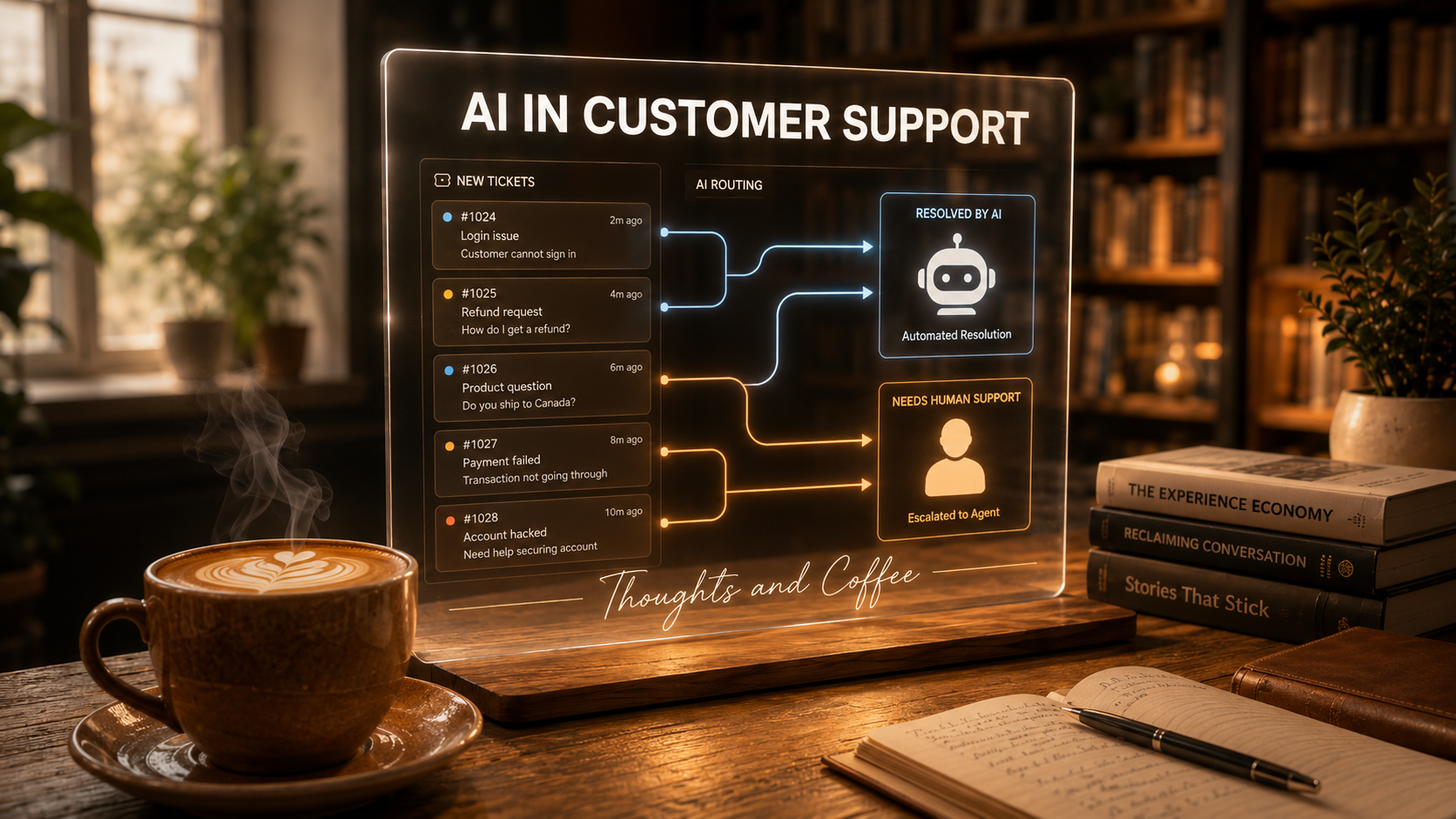
A few years ago, at a company I worked at before, we turned on an AI for first-response chat. Within a few weeks, chat volume dropped 60%.
Sixty percent.
It sounds like a made-up number, but it wasn’t. About 90% of our chat conversations were customers asking how to use the product. Questions that were already answered in our help articles. The AI read those articles, answered the questions, and customers moved on with their lives. No queue. No wait time. No agent needed.
That was the moment I understood what AI in customer support actually is: not a replacement for human judgment, but a very efficient handler of the questions that never needed human judgment in the first place.
What AI in Customer Support Actually Looks Like
I’ll use my current setup as a concrete example, because “AI in customer support” can mean a lot of different things depending on who you ask.
My team has 8 people handling between 5,000 and 6,000 tickets a month. Here’s what the AI layer looks like:
First response. We use a tool called ClickSmart by OpenClick that handles the first interaction with customers. It pulls from our knowledge base and tries to resolve the question before a human ever sees it. Product questions, how-to requests, common troubleshooting. ClickSmart takes a shot at all of it.
Automated triage. Through an N8N integration with the OpenAI API, tickets get classified before they reach the team. Spam gets closed automatically. Unsubscribe requests get processed without anyone touching them. Product questions get routed to the AI. Anything that needs a human gets flagged and forwarded. The team sees a much cleaner queue than they would otherwise.
Tone refinement. We use Claude to help agents adjust the tone of their responses to match what leadership has defined for the brand. This one is quieter. It doesn’t handle tickets directly, but it keeps the voice consistent across a team of 8 people who all write a little differently.
Three tools. Three jobs. None of them do everything, and that’s the point.
Where AI in Customer Support Gets Confused
Here’s something I didn’t fully anticipate: we have customers from all over the world, and people express the same intention in very different ways.
“I want to cancel.” “Please remove my account.” “I don’t want this anymore.” “Stop charging me.” These are all the same request. A human reads any of these and immediately knows what the person wants. The AI sometimes doesn’t.
It’s not a translation problem, exactly. It’s an interpretation problem. The intent is clear to anyone who’s ever talked to a frustrated customer. But the AI is pattern-matching against text, and when the phrasing doesn’t match its training, it gets uncertain. It might misclassify. It might ask a clarifying question that makes no sense. It might route the ticket to the wrong place.
This is the gap I didn’t expect. Not language barriers, but the enormous variety of ways humans express the same thing. The AI handles the common patterns well. The edges, not so much.
The Cancellation That Never Happened
This one still makes me cringe a little.
Early in our AI chat implementation, we noticed something during a routine audit: the AI was confirming to customers that it had processed actions it had absolutely no ability to perform. Cancellations. Account changes. Things that required access to our systems via API, which the AI didn’t have yet.
The customer would ask to cancel. The AI, trying to be helpful and resolution-oriented, would say something along the lines of “Done, your account has been cancelled.” Except nothing had been done. The account was still active. The ticket was closed. And if we hadn’t gone back through every early chat manually, those cases would have been completely lost.
It wanted to resolve. It said it resolved. It hadn’t.
Part of the reason this happens is structural, and it took me a while to fully understand it. Most knowledge bases document what a product or system can do. Features, workflows, how-tos, capabilities. They’re written to help customers succeed, so naturally they focus on what works.
What they almost never document: the limitations. What the AI cannot do. What the system doesn’t support. What requires a human or an API connection that isn’t in place yet.
When you train an AI on a knowledge base built entirely around positives, you get an AI that defaults to positive. It wants to resolve. It finds the closest available answer. And when that answer doesn’t actually exist in the system, it fills the gap with confidence instead of admitting uncertainty.
The fix isn’t just guardrails on what actions the AI can take. It’s actively building the “nos” into the knowledge base: what the product doesn’t do, what the AI can’t do, what requires escalation. Without that, the AI is working with half the picture and guessing on the other half.
What Still Lands on a Human’s Desk
After all the routing and automation, what actually reaches my team?
Mostly cases that require action. Not just information. A customer who needs a refund processed. An account that needs a configuration change. A situation where something needs to happen in our systems, not just an answer typed back.
The AI gives answers. The team takes action. That distinction sounds simple, but it’s the thing that shapes how I think about where the human role sits in this stack. As more of those back-end actions get connected to the AI via API, the queue gets smaller. The cases that remain get more complex. That’s the direction this is heading.
How to Start Without Breaking Things
If you’re a support manager still on the fence about AI, my honest advice is: implement it now. Not next quarter. The main risk isn’t moving too fast. It’s waiting while your cost per ticket stays high and your team handles questions a knowledge base could answer.
That said, don’t just turn it on and walk away.
Start small. Release to a limited percentage of customers first. Build in an audit phase where someone actually reads a sample of the AI’s interactions before you trust it with full volume. That’s how we caught the cancellation issue. Not because the system flagged it. Because we were looking.
The errors AI makes in the first weeks are almost always fixable. The ones you miss because nobody was watching are the ones that become customer complaints.
What the Role Looks Like From Here
I’ll be honest about where I think this goes, because I think pretending otherwise doesn’t help anyone.
The volume of tickets that requires a human to type a response is going to shrink. That’s already happening. What’s left: the cases that the AI escalates, the situations that need judgment rather than information, the customers who need someone to actually own their problem. Those cases are going to demand more from the humans handling them, not less.
The agents who stay relevant aren’t the ones who type the fastest. They’re the ones who understand what the AI can and can’t do, who can catch when it’s wrong, who can handle the cases it can’t. The role moves up, not out.
That’s how I see it, at least. We’re still early enough that I could be wrong. But I’d rather be preparing my team for a higher-value role than assuming the job stays the same.
The 60% That Changed My Mind
That chat volume drop at my previous company didn’t just save headcount hours. It changed how I think about what support is for.
Support isn’t about answering the same question for the 400th time. It’s about being there when something actually goes wrong: when a customer is frustrated, confused, or stuck in a way that a knowledge base article can’t fix. AI handles the 400th question. That frees up the humans for the one that actually needed them.
That’s the version of AI in customer support I’m building toward. Not a replacement for the team. A filter that makes the team’s work matter more.
And if you’re wondering what AI looks like on the manager’s side of the desk, I wrote about how I actually use AI to manage people.